Germany has one of the most fragmented television markets in Europe. Between public broadcasters, regional channels, private networks, and premium sports packages, keeping up with everything you want to watch through traditional cable or satellite can mean juggling three or four different subscriptions — and just as many remote controls. That’s a big part of why IPTV live channels in Germany have grown so popular among households over the last few years.
If you’ve heard the term “IPTV live channels” thrown around but aren’t quite sure what it actually means, how it works, or whether it’s worth switching to, this guide walks through everything from the basics to what to actually look for when choosing a service.
What Does “IPTV Live Channels” Actually Mean?
IPTV stands for Internet Protocol Television. Instead of receiving a broadcast signal through a satellite dish, an antenna, or a cable line, your TV signal is delivered over the internet — the same connection you already use for browsing or streaming.
“Live channels” specifically refers to real-time broadcast content: news, sports, entertainment shows, and everything else airing right now, as opposed to on-demand content like movies or series you choose to watch whenever you want. A modern IPTV subscription usually bundles both together, but the live channel lineup is what most people are comparing when they look at different providers, since that’s the part that most closely mirrors a traditional TV package.
Technically, an IPTV live channel is delivered as a continuous video stream, usually organized into a playlist file (commonly in M3U or Xtream Codes format) that your player app reads to know which channels are available and where to pull the stream from. You don’t need to understand the technical side to use it — you just need a compatible app and a set of login details or a playlist link.
Why German Viewers Are Switching to IPTV Live Channels
A few things make IPTV live channels in Germany particularly appealing specifically. Traditional TV is fragmented: between ARD, ZDF, the regional third programs, RTL, Sat.1, ProSieben, Sky Deutschland, DAZN, and various pay-per-view sports packages, a household that wants comprehensive coverage of news, entertainment, and sport can end up paying for several separate subscriptions. IPTV services typically bundle a much broader range of channels — often including German, European, and international content — into a single package.
There’s also no satellite dish or cable installation to worry about. Renters in apartment buildings, in particular, often face restrictions on installing satellite dishes. IPTV sidesteps this entirely since it only needs an internet connection. On top of that, a single subscription typically works across a Smart TV, a phone, a tablet, and a streaming box like a Fire Stick — so you’re not locked into watching in one room on one piece of hardware.
Germany also has large communities with roots in Turkey, the Balkans, the Arab world, and elsewhere. Traditional German cable packages rarely cover channels from these regions well, while IPTV catalogs frequently include a wide range of international channels alongside the German lineup.
What Kind of IPTV Live Channels Are Typically Included
IPTV channel lists vary by provider, but a well-rounded package generally covers German entertainment and news from the major private and public broadcasters, sport including the leagues fans follow most closely — from the Bundesliga to the Champions League and international leagues like the Premier League and La Liga — movie and series channels, documentary and kids’ channels, and a wide range of international channels covering other European countries, the Middle East, and beyond.
A quality IPTV Live DE subscription typically includes over 55,000 live channels alongside a library of on-demand movies and series, which is a very different scale from what a standard cable package offers.
Streaming Quality: What 8K, 4K, and FHD Actually Mean for You
Channel count matters, but so does stream quality. IPTV channels are generally delivered in one of a few quality tiers: FHD (1080p) is the standard for most channels, sharp on any screen up to a large TV; 4K is increasingly common for premium sports and flagship channels, noticeably sharper on larger displays; 8K is still rare industry-wide, but growing as more content is mastered at that resolution.
In practice, your actual viewing experience depends as much on your internet connection as it does on the service itself. A stable connection of at least 15–25 Mbps is generally recommended for smooth FHD streaming without buffering, with more needed for 4K content, especially if multiple devices in the household are streaming at once.
Devices That Work With IPTV
One of the most common questions from people considering IPTV for the first time is simply: will it work on what I already have? In most cases, yes. IPTV apps are available for Smart TVs (Samsung, LG, and most major brands support IPTV apps either natively or through sideloading), streaming boxes and sticks (Amazon Fire TV Stick, Android TV boxes, and similar devices), phones and tablets on both Android and iOS, MAG boxes and dedicated IPTV boxes for a more traditional set-top box experience, and computers via desktop player apps.
Most providers, including IPTV Live DE, support all of the above under a single subscription, so you’re not paying separately for each device.
IPTV Playlists vs. Player Apps: An Important Distinction
This is one of the most misunderstood parts of IPTV, and it’s worth explaining clearly because it affects what you’re actually paying for.
An IPTV playlist (delivered as an M3U link or Xtream Codes login) is the actual content: the live channels, movies, and series. Without a playlist, a player app has nothing to show you.
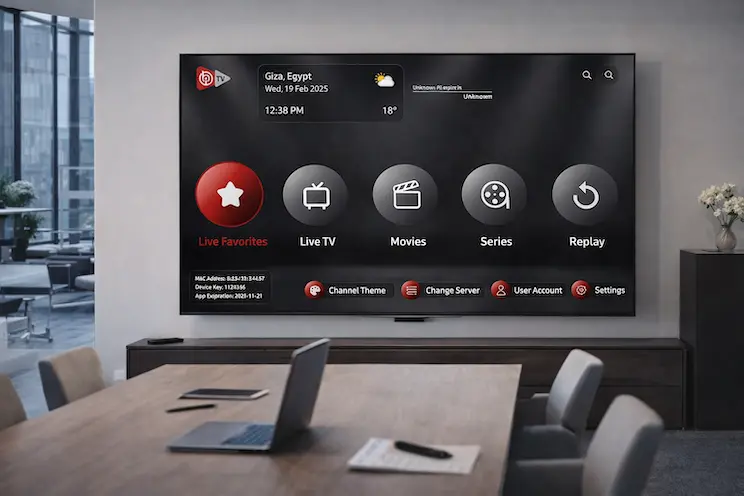
A player app, like IBO Player, is the software that reads the playlist and displays it on your screen in an organized, user-friendly interface — channel guides, categories, search, favorites, and so on. Some player apps come with a free trial period and then require a one-time or annual activation to keep using the app itself. If you want a closer look at how the app itself works beyond just the activation, IBOPlayerPro covers the player in more detail.
The important part: activating a player app and subscribing to a playlist are two separate things. Activating IBO Player, for example, only unlocks the app — it doesn’t come with any channels included. The channels and content come exclusively from a separate IPTV playlist subscription. Providers sometimes bundle both together, but it’s worth understanding the distinction so you know exactly what you’re paying for at each step.
IPTV vs. Traditional Cable and Satellite in Germany
It helps to see the differences side by side, since the trade-offs aren’t always obvious until you’ve lived with one option for a while. Cable requires a wired connection from your provider, often tied to your building. Satellite needs a dish with a clear line of sight to the south, which isn’t always possible or allowed in rented apartments. IPTV needs nothing beyond the internet connection you likely already have.
German cable and satellite providers frequently lock customers into 12- or 24-month contracts with early termination fees. IPTV plans are usually available month-to-month, with longer plans offered purely as a discount option rather than a requirement. Cable and satellite packages are also curated by the provider and tend to focus heavily on German and Western European content, with international channels often placed in expensive add-on tiers, while IPTV catalogs are typically broader by default.
Traditional providers often charge per additional receiver or room, while IPTV subscriptions generally cover multiple devices under the same plan. That’s usually where the cost comparison tips clearly in IPTV’s favor: a German household paying separately for basic cable, a sports package, and a couple of streaming subscriptions can easily spend more per month than a single well-rounded IPTV plan covering the same ground.
Sports Fans: What IPTV Means for Bundesliga and Beyond
Sport is often the single biggest reason people investigate IPTV in the first place, and Germany’s sports broadcasting landscape is a good example of why. Bundesliga rights alone are split across more than one broadcaster in a typical season, and that’s before factoring in the Champions League, DFB-Pokal, international leagues like the Premier League and La Liga, Formula 1, tennis majors, and combat sports events that each tend to live behind their own separate subscription.
A well-stocked IPTV package brings sports coverage together in one place instead of requiring a subscription per competition. As with entertainment channels, stream stability matters most here — nobody wants to lose a feed during a penalty shootout — so if sport is your main reason for considering IPTV, it’s worth testing a free trial specifically during a live match before committing to a longer plan.
Understanding Xtream Codes vs. M3U Links
If you spend any time researching IPTV, you’ll run into these two terms constantly, and they cause more confusion than almost anything else in the space.
An M3U link is essentially a plain text playlist file — a list of channel names paired with stream URLs. Most player apps can read an M3U link directly; you just paste it in once and the app loads the full channel list.
Xtream Codes is a more structured system: instead of a single static link, you’re given a server address, a username, and a password. The player app uses these credentials to pull an organized, categorized channel list along with a proper electronic program guide (EPG) in many cases, plus separate sections for live TV, movies, and series.
In practice, Xtream Codes tends to offer a smoother, more app-like experience with better organization, while M3U links are simpler and work in a slightly wider range of basic player apps. Most modern IPTV providers, including IPTV Live DE, support both formats, so you can choose whichever your preferred player app works best with.
What to Look For in an IPTV Provider
Not all IPTV services are created equal. More isn’t always better if a large channel count is padded with duplicate or low-quality feeds, but a provider offering 50,000+ channels across sports, entertainment, news, and international content generally reflects a more comprehensive catalog than a service offering a few thousand. Some providers, like IPTV 8K, focus specifically on ultra-high-definition streaming for viewers who prioritize picture quality above all else.
Beyond channel count, pay attention to stream stability — buffering during a live match is the most common complaint IPTV users have, so ask about server infrastructure or, better yet, request a free trial before committing to a longer plan. Make sure the service explicitly supports the devices you actually own, and look for flexible plan lengths: monthly, quarterly, half-year, and annual options let you test a service without committing to a full year upfront.
Since IPTV isn’t a regulated utility with a customer service hotline, the quality of support — often via WhatsApp or similar messaging apps — makes a real difference when something isn’t working. A provider confident in their service will generally offer a short free trial so you can test channel quality and stability on your own setup before paying.
Common Problems and How to Avoid Them
Even a good IPTV service can run into occasional hiccups. Buffering during peak hours is usually tied to either your own internet connection being shared across too many devices at once, or the provider’s server load during high-traffic events like major football matches. A wired connection, rather than Wi-Fi, to your streaming device often resolves connection-side buffering.
Occasionally a specific channel feed goes down while others keep working fine — this is normal across any IPTV service and is usually resolved on the provider’s end within minutes to hours. Testing an alternative channel in the same category is a quick way to confirm whether it’s an isolated issue.
Confusion between app activation and channel subscription is one of the most common points of confusion for new users. If your app works but shows no channels, double-check whether you’ve entered your playlist details separately from any app activation code. It’s also worth keeping your player app updated, since IPTV apps update periodically to keep up with device software changes, avoiding most compatibility issues after major OS updates.
Getting Started With IPTV Live DE
If you’re ready to try IPTV instead of juggling multiple subscriptions, here’s roughly what the process looks like: reach out via WhatsApp, or through our Contact Us page, to ask about current plans and get a free trial set up. Test the trial on your actual device — TV, phone, or streaming box — to check channel quality and stability on your own internet connection. Choose a plan length that fits how you watch: monthly if you want to try it properly before committing, or a longer plan (3, 6, or 12 months) for better value once you know it works well for you. Get your access details immediately after payment is confirmed, and start streaming the same day.
IPTV Live DE offers 55,000+ live channels, 175,000+ movies, and 45,000+ series in 8K, 4K, and FHD quality, alongside IBO Player activation for a smooth, app-based viewing experience across every device in your household.
Frequently Asked Questions
Do I need special hardware to use IPTV?No. A Smart TV, streaming stick, phone, tablet, or computer with a stable internet connection is generally all you need.
How much internet speed do I actually need?For smooth FHD streaming, 15–25 Mbps is a reasonable baseline. If multiple people in your household stream at once, or you want consistent 4K playback, a faster connection helps.
Can I watch on more than one device?This depends on the specific plan and provider — the number of simultaneous connections allowed varies, so it’s worth confirming this detail when you set up your subscription.
Is there a difference between “channels” and “movies/series” in an IPTV package?Yes. Live channels are continuous broadcast streams — news, sport, entertainment airing in real time — while movies and series are on-demand content you choose and start whenever you like. A complete IPTV package includes both.
Do I need a VPN to use IPTV in Germany?Not for the service to function technically — a VPN is a separate, optional layer some users add for general internet privacy, and isn’t a requirement for streaming itself.
What’s the difference between a monthly and an annual plan?Monthly plans cost more per month but let you confirm the service works well for you before committing further. Longer plans (3, 6, or 12 months) typically offer a lower effective monthly price, making them better value once you’re confident in the service.
Can I switch player apps later without losing my subscription?Generally yes, since your IPTV playlist isn’t tied to a single app — you can enter the same credentials into a different compatible player app if you decide to switch.
What happens if a channel buffers or goes down?Occasional issues can happen with any streaming service, which is why server stability and responsive support matter when choosing a provider. Testing with a free trial before committing to a longer plan is the best way to check reliability on your own connection.
Final Thoughts
For German households tired of piecing together multiple subscriptions to cover sport, entertainment, news, and international content, IPTV live channels in Germany offer a genuinely simpler alternative — one subscription, one app, and access across every device you own. The key is understanding what you’re actually paying for, testing before committing through a free trial, and choosing a provider with a channel lineup and support quality that actually fits how you watch.
The switch doesn’t have to be all-or-nothing, either. Plenty of households keep a basic terrestrial or cable connection as a backup while testing IPTV as their primary source for sport and entertainment, only fully switching over once they’ve confirmed it handles everything they actually watch. Starting with a short trial, on the actual device and connection you’ll be using day to day, remains the most reliable way to judge whether a service is right for your household before committing to a longer plan.